What Happens When You Run Out of Minutes or Texts?
A TenantCall landlord number comes with a monthly pool of minutes and texts rather than unlimited use — but for almost every landlord, that's not something you'll ever actually need to think about. The pool is shared across every property on your plan rather than split up per property, so a quieter property's unused minutes and texts cover a busier one without you having to do anything. Ordinary landlord-tenant contact, even across several properties, tends to sit well inside a typical plan's pool: the odd maintenance call, a text chasing a repair, the occasional longer conversation. It would take an unusually eventful month across your whole portfolio — several properties with drawn-out issues all at once — to get anywhere near the edge of it. Still, it's worth knowing what actually happens if you ever do.
Check your usage, just in case
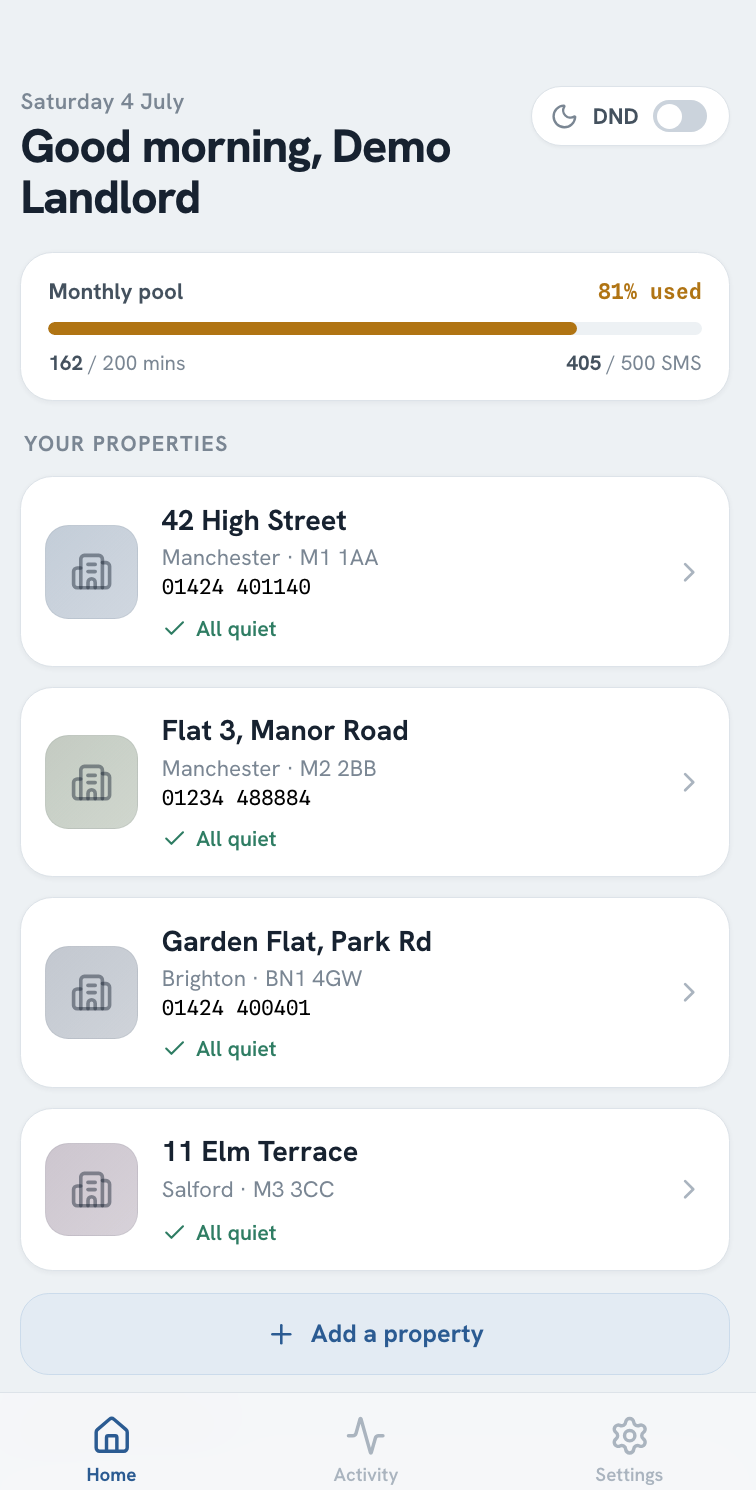
Your dashboard shows a single monthly usage bar for minutes and texts, covering every property on your plan rather than one per property. Most months it'll sit comfortably in the green — but it's there if you ever want to check, and it's the easiest way to spot a plan that's genuinely outgrowing its pool, rather than just one property having a busier month than usual.
Re-letting a property rarely dents the pool either
The busiest a property's line typically gets is while you're between tenants — a listing goes back up, and enquiries about viewings cluster into the first few days it's live. That's still not the same as eating into your pool in any noticeable way: most viewing enquiries are short calls confirming the property's still available and arranging a time to look round, not long conversations, so even a dozen or more calls in the same week adds up to a small fraction of a typical monthly allowance.
Missed calls during that window still get transcribed, so if a run of enquiries arrives while you're showing round another property, you can skim through several messages in the time it'd take to relisten to just one, and call back (or text, if your number supports SMS and your text allowance hasn't run out) once you're free rather than working through a stack of voicemails end to end. For more on keeping that window covered, see How Missed Tenant Calls Drive Up Void Periods.
What happens on the rare month you do run out
There's no small buffer to fall back on — once you hit your monthly limit for minutes or texts, that channel simply stops working until it resets. For calls, that means incoming calls no longer ring through to you live, much the same as if you'd switched on do-not-disturb — but voicemail, transcription, and the missed-call text reply (on a number that supports SMS) all keep working regardless, so a tenant's call is still captured and you're still alerted to it, just not live (that reply draws on your text allowance, not your minutes, so a minutes overage doesn't touch it). Texts are more clear-cut: once you're over your text allowance, they stop sending and receiving entirely, including that same missed-call reply, until your usage resets — or immediately if you upgrade to a larger plan with immediate effect.
Calling a tenant yourself still works once you're out of minutes, just not the normal way. Tapping Call tenant in the app falls back to dialling the tenant directly from your own phone, with your caller ID withheld (a 141 prefix) so your personal number still doesn't show. You can still talk to them, but because that call isn't routed through TenantCall, it isn't recorded or transcribed the way your other calls are. Dialling in with your PIN instead, for when you're not on your own phone, still depends on TenantCall's own number, so that route doesn't work again until your usage resets or you upgrade to a larger plan with immediate effect — choosing to upgrade at your next renewal instead won't restore it any sooner.
If you're consistently close to the limit
For most landlords this never comes up more than once, if at all — especially since the pool covers your whole portfolio rather than one property at a time, so a single busy property is usually absorbed by quieter ones elsewhere. A single unusually busy month isn't something to restructure your plan around. But if you find you're regularly close to your limit month after month, that's a sign your plan's pool no longer matches your portfolio's overall volume, and moving to one with a larger monthly pool keeps everything routed normally — calls ringing through, texts sending (on a number that supports SMS), and calls recorded and transcribed as usual (on a consent basis, same as always) — instead of relying on the fallbacks above while you wait for the next reset.
Getting started
Our pricing page covers the monthly minutes and texts included at each tier, so you can see what fits your portfolio before you sign up. If you're already on a plan and want to check whether a larger one makes sense, the Get Started page is the quickest way to ask about moving up without losing your existing number.
Frequently asked questions
What happens when I run out of minutes or texts on my landlord number?
It's rare to get anywhere near your monthly limit in ordinary use, but if you ever do, there's no grace buffer to lean on. If it's minutes you've exhausted, calls stop ringing through to you live, the same as if you'd turned on do-not-disturb — though voicemail, transcription, and the missed-call text reply (on a number that supports SMS) keep working regardless, so a tenant's call is still captured (that reply comes out of your text allowance, not your minutes, so it isn't affected by a minutes overage). If it's texts you've exhausted, that's more clear-cut: they stop sending and receiving entirely, including that same missed-call reply, while call forwarding is unaffected. Either way, it resets with your next billing cycle, or immediately if you upgrade to a larger plan and choose for that to take effect straight away rather than at your next renewal.
Can I still call a tenant myself if I've run out of minutes?
Yes, if you're calling from your own phone — tapping Call tenant in the app falls back to dialling the tenant directly, with your caller ID withheld so your personal number still doesn't show. That call won't be recorded or transcribed like your other calls, though, since it isn't routed through TenantCall. Dialling in with your PIN instead still depends on TenantCall's own number, so that route doesn't work again until your usage resets or you upgrade to a larger plan with immediate effect.
Is the minutes and texts pool shared across all my properties, or does each one get its own?
It's shared across every property on your plan rather than split up per property. That means a quieter property's unused minutes and texts effectively cover a busier one in the same month, which is a large part of why hitting the overall limit is uncommon even if one property has an unusually active month.
Will a flurry of viewing calls while I'm re-letting a property use up my minutes?
Not in any way you're likely to notice. Viewing enquiries tend to be short calls confirming the property's still available and arranging a time to look round, so even a run of a dozen or more calls in the same week adds up to a small fraction of a typical monthly pool — especially since that pool covers your whole portfolio, not just the property being re-let.
How do I check how many minutes or texts I have left?
Your dashboard shows a monthly usage bar for minutes and texts, covering your whole plan rather than one property at a time, which changes colour as you get closer to your limit. That gives you a running view of how much of your monthly pool is left, rather than finding out only once you've gone over.
What should I do if I keep running close to my monthly limit?
If you're consistently close to your limit, moving to a plan with a larger monthly pool (with the upgrade taking effect immediately, not scheduled for your next renewal) means you're not at risk of live call forwarding and texts stopping altogether while you wait for the next billing cycle to reset.