How to Stop Tenants Calling You Late at Night
Self-managing landlords tend to end up on call permanently without ever deciding to be. A tenant has your number, a tenant calls, and answering becomes the path of least resistance — at 6pm, at 9pm, at 11pm on a Tuesday. There's no moment where "always reachable" was actually agreed to; it's just what happens by default once a personal mobile is the only line in.
"Just don't answer" isn't a boundary
The obvious fix — let evening calls ring out — doesn't hold up in practice. A personal phone can't tell a tenant why it wasn't answered, so a call that goes unanswered reads as ignored rather than as "outside working hours, try tomorrow." That ambiguity tends to push landlords back into answering anyway, just to avoid seeming unresponsive, which is how "ignore evening calls" quietly turns back into "answer evening calls" within a week.
How to set working hours for tenant calls
A dedicated landlord number replaces that guesswork with a setting rather than a habit you have to maintain — if you haven't settled on which kind of second number to get yet, a second SIM, a dual-SIM phone, and a virtual number trade off differently on exactly this:
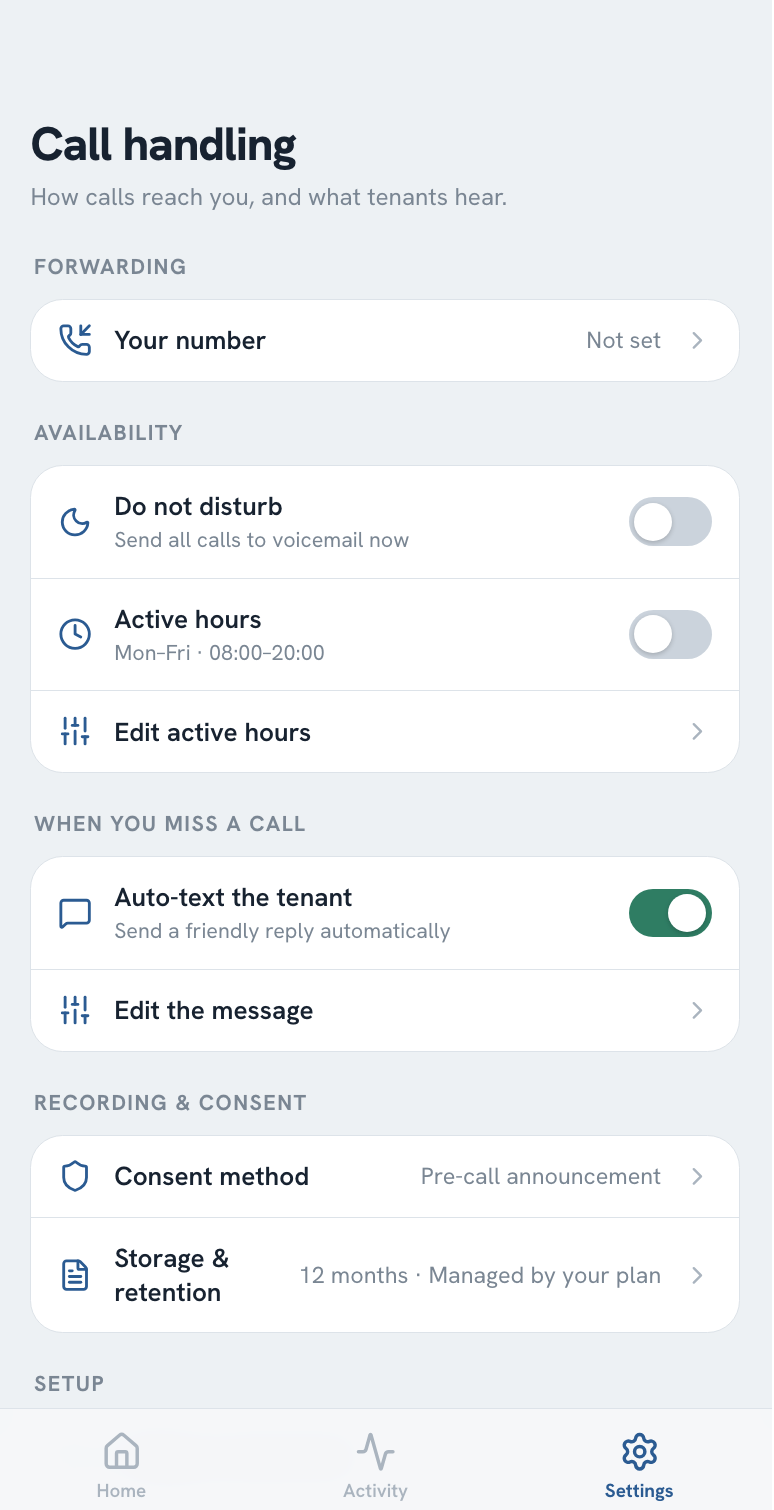
- Active hours send calls straight to voicemail outside the times you've set, so a 9pm call never reaches your phone in the first place — there's nothing to decide to ignore
- Automatic text reply goes to the tenant the moment a call is sent to voicemail, on a number that supports SMS and provided your monthly text allowance isn't exhausted, so "no answer" reads as "outside hours, here's what to do instead" rather than silence
- Voicemail transcription turns whatever they left into text you can read in seconds the next morning, instead of a message you have to relisten to
None of this requires switching your phone off or screening tenants out — it moves the boundary onto the number itself, so it holds even on the evenings you'd otherwise forget to enforce it.
A manual override for the one-off evening
Active hours cover the routine week, but not every quiet evening is on a schedule — a family dinner, a day you'd rather not think about tenants at all. A do-not-disturb toggle handles that case directly: switch it on for the evening and calls route to voicemail regardless of your set hours, then switch it back off and your normal schedule resumes. It's a single setting rather than a workaround involving your phone's own do-not-disturb mode, which would also block calls and texts that have nothing to do with tenants.
What still gets through
Setting hours only works long-term if a genuine emergency doesn't get stuck behind them. On plans that support it, a caller can mark their voicemail as urgent before hanging up, so it's flagged clearly rather than sitting unread alongside routine messages until you next check. That's a label on a message, not a live alert — it won't ring through or wake you up on its own — so it's worth telling tenants plainly that a suspected gas leak, a break-in, or anything of that kind should go to 999 or the relevant emergency service first, not to a voicemail that might sit until morning.
Getting started
If evening calls are the specific problem, our pricing page covers which tiers include urgent voicemail flagging, and the Get Started page is the quickest way to ask about setting up active hours for your own portfolio.
Frequently asked questions
Can I set specific hours for tenants to call me?
Yes — a dedicated landlord number can be configured with active hours, so calls outside the times you set go straight to voicemail instead of ringing your phone. A personal mobile has no equivalent setting; the only way to enforce quiet hours on it is to mute or silence the phone itself, which blocks everything, not just tenant calls.
What happens if a tenant calls outside my active hours?
The call goes to voicemail, which is automatically transcribed to text, and the tenant gets an automatic text reply acknowledging their call so it doesn't read as ignored — on a number that supports SMS and provided your monthly text allowance isn't exhausted, since that reply is a text too. You then see the message when you next check, rather than being woken by it.
Will I still find out about a genuine emergency outside my hours?
On plans that support it, a caller can flag their voicemail as urgent before they leave it, so it stands out from routine messages instead of getting buried among them. That only tags the message rather than ringing through live or alerting you immediately, so for something like a suspected gas leak or a break-in, it's worth telling tenants upfront to call 999 or the relevant emergency service directly rather than relying on any phone system to make that judgement call for them.
Can I override my active hours for a single evening?
Yes — a manual do-not-disturb toggle covers a one-off evening, a holiday, or just a day off, without editing your regular schedule or switching your actual phone to airplane mode. It reverts to your normal active hours once you turn it back off.